Understanding Microsoft AI Stack
Updated: Jun 10
Current as of June 2026. This article reflects Microsoft AI capabilities and documentation available at the time of writing. Product names, licensing, and preview status may change. In this article, status labels are used consistently: GA for generally available capabilities, Preview for public preview, Frontier for Microsoft’s Frontier preview program, and Emerging for evolving Microsoft framing that should not be treated as a fully settled long-term architecture.
Introduction
As a technology leader and software engineering manager, I have come to see that understanding AI is no longer optional. It is becoming essential for leading development teams effectively and for helping organizations adopt AI with confidence. Because my career has centered on Microsoft technologies, it was natural for me to focus on Microsoft’s AI ecosystem.
As I began my learning journey, I found relevant information scattered across many pages and YouTube videos. That led me to write this blog post to bring the Microsoft AI stack together in one place. This felt especially useful because the ecosystem now spans a wide range of products, services, and emerging capabilities, making it harder for IT leaders, architects, developers, and decision-makers to understand how the pieces fit together. Microsoft documents these capabilities separately across product, platform, and extensibility guidance; this article organizes them into a layered enterprise architecture as an author synthesis rather than as a Microsoft-published canonical diagram. The goal is to show how user experiences, agents, integration and extensibility, enterprise intelligence, and execution platforms relate to one another, while governance and security operate across them as cross-cutting controls within a broader operating model for enterprise AI.
This first post is closer to a paper than a typical blog post 😊, and it aims to provide an overview of the Microsoft AI stack. Future posts will explore selected areas, examples, and practical scenarios in greater depth.
This post reflects my current understanding and architectural interpretation of Microsoft’s AI offering based on Microsoft documentation, product announcements, and related technical materials available at the time of writing. I have made a strong effort to keep the content accurate and aligned with current Microsoft guidance, but some areas, especially preview capabilities, fast-moving announcements, and evolving platform terminology, may change over time. Despite my efforts to be as technically accurate as possible, readers should rely on official Microsoft documentation for the most current product details, licensing requirements, and preview status before making any decisions.
I have used AI tools extensively to write this post, especially Microsoft 365 Copilot and Grammarly, to ensure the sentences are clear and correct. To research this blog, I used Microsoft Documentation, Researcher, Claude Opus 4.8, and ChatGPT 5.5 (Pro). I have used Copilot and ChatGPT to generate the images in this post based on Microsoft Documentation.
To validate the blog’s technical accuracy, clarity, and style, I asked Claude Opus 4.8 (Max), Claude Fable (Max), ChatGPT 5.5 (Pro), Gemini 3.1 (Extended Thinking), and Grok 4.3(Thinking) to review and score it. The table below shows how each scored it.
Model | Accuracy | Clarity | Style | Total Score |
|---|---|---|---|---|
Claude Opus 4.8 (Max) | 9.5/10 | 8.5/10 | 8.5/10 | 8.8/10 |
Gemini 3.1 (Extended Thinking) | 10/10 | 8.5/10 | 9.5/10 | 9.3/10 |
ChatGPT 5.5 (Pro) | 9/10 | 8.6/10 | 8.2/10 | 8.6/10 |
Grok 4.3 (Thinking) | 9.7/10 | 9.6/10 | 8.9/10 | 9.4/10 |
Claude Fable (Max) | 9.5/10 | 8.5/10 | 8.5/10 | 8.8/10 |
Microsoft AI Stack Overview
I organize Microsoft’s AI offering as a layered enterprise architecture with five parts: user experience, agents, integration and extensibility, enterprise intelligence, and execution platforms. This is an author's interpretation, not a Microsoft-published canonical stack. Microsoft documents these capabilities across separate products and platforms; this article brings them together into one model to make the relationships easier to understand. In this model, governance, security, identity, compliance, observability, and responsible AI are cross-cutting controls, not separate runtime layers. They shape how every layer accesses data, uses tools, takes actions, and stays accountable. This framing also helps explain Build 2026 announcements, especially Microsoft’s newer emphasis on Microsoft IQ as a more unified enterprise intelligence layer.
These layers are:
User Experience Layer (Microsoft 365 Copilot)
Agent Layer (Copilot agents)
Integration & Extensibility Layer (connectors, APIs, tools, and protocols)
Enterprise Intelligence Layer (Microsoft IQ)
Execution Platform Layer (Microsoft Foundry)

Note: this diagram reflects my architectural synthesis of Microsoft’s AI offering based on Microsoft documentation, product announcements, and related technical materials available at the time of writing. Microsoft documents these capabilities separately; this article organizes them into a layered enterprise architecture as an author's synthesis rather than as a single canonical Microsoft diagram.
Status note: unless otherwise stated, established Microsoft 365 Copilot capabilities discussed in this article should be read as generally available, while features explicitly labeled Preview, Frontier, or Emerging are evolving and may change in scope, naming, licensing, or architecture.
Across all five layers, governance and security remain essential cross-cutting concerns rather than a peer layer in the runtime stack. Identity, permissions, compliance, information protection, observability, auditability, lifecycle control, and responsible AI together form the control fabric that constrains how the Microsoft AI stack operates in production.
Two foundational capabilities help explain how the user experience and enterprise intelligence layers work in practice: Microsoft Graph and the Semantic Index.
Microsoft Graph is the gateway to data and intelligence across Microsoft 365 and Microsoft Entra. It gives Microsoft 365 Copilot and related experiences access to work context across emails, files, meetings, chats, calendar events, people, groups, and other Microsoft 365 signals, while staying bounded by existing permissions, Microsoft Graph permissions, and service-level controls. In this architecture, Graph is more than a developer API surface. It is one of the main foundations for context retrieval and grounded action across user experiences, agents, and enterprise intelligence. [Source: Microsoft 365 Copilot architecture]

Microsoft describes the Semantic Index as an advanced lexical and semantic index generated from content in Microsoft Graph to improve search relevance and support contextually relevant responses in Microsoft 365 Copilot. A lexical index helps the system find content through words and phrases. A semantic index helps it find content by meaning, even when the prompt does not match the source wording exactly. Microsoft explains that this works through vector representations of content, which let the system compare conceptual similarity at scale. In practice, this helps Copilot retrieve the right context when a user asks a natural-language question that does not mirror the wording in a document, email, chat, or meeting artifact. This is also part of grounding: giving the AI relevant organizational context at request time so the response is based on enterprise data rather than only on general model training. Combined with Microsoft Graph signals such as relationships among people, files, meetings, conversations, and activities, the Semantic Index helps Copilot and Microsoft Search find information that is relevant both to the query and to the user’s work context and permissions. [Source: Semantic indexing for Microsoft 365 Copilot]

User Experience Layer (Microsoft 365 Copilot)
Microsoft 365 Copilot is the primary user-facing AI experience in Microsoft’s enterprise stack, embedded across Microsoft 365 applications to help users draft, summarize, search, analyze, and create content within the flow of daily work. It draws on Microsoft Graph to access a user’s work context across emails, chats, files, meetings, and documents, and it uses semantic indexing to improve the relevance and quality of retrieval. Because Copilot operates within the organization’s existing permission model, it only accesses data the user is authorized to see, allowing responses to be grounded in real enterprise context while remaining aligned with security and governance controls. In practice, this makes Microsoft 365 Copilot the main interaction surface for everyday knowledge work across functions such as sales, operations, finance, procurement, HR, and executive support. It requires an eligible Microsoft 365 or Office 365 plan together with a separate Microsoft 365 Copilot license. [Sources: Microsoft 365 Copilot architecture; Set up Microsoft 365 Copilot and assign licenses]
Copilot Chat is part of the Microsoft 365 Copilot experience and is available at no additional cost for eligible Microsoft Entra account users with qualifying Microsoft 365 or Office 365 subscriptions. Microsoft describes it as secure, enterprise-ready AI chat grounded primarily in web data and protected by enterprise data protection. Users can access it through the Microsoft 365 Copilot app and web experience, and it can also appear in Teams, Outlook, and the Edge sidebar depending on configuration and surface availability. Copilot Chat includes features such as image generation, Copilot Pages, and access to agents, including pay-as-you-go agents. Unlike Microsoft 365 Copilot, Copilot Chat does not automatically ground chat responses in organizational Microsoft Graph data such as files, emails, or chats. However, users can still provide organizational context by uploading files, pasting content, using Copilot Chat in Outlook, or interacting with configured agents that have access to organizational content. Users with a Microsoft 365 Copilot license get a richer experience, including chat grounded in work data and broader in-app Copilot experiences across applications such as Word, Excel, PowerPoint, Outlook, and Teams. [Source: Overview of Microsoft 365 Copilot Chat]
Copilot Search is an AI-enhanced search experience within Microsoft 365 Copilot that helps users find relevant information across Microsoft 365 and, through Microsoft 365 Copilot connectors, connected external sources. Microsoft describes it as improving retrieval beyond exact keyword matching by using semantic understanding, context, and existing permissions to surface relevant content more effectively. In practice, this helps users locate items such as documents, policies, conversations, and related information across the enterprise while remaining bounded by the organization’s access controls and connector configuration. For organizations focused on knowledge management and workflow efficiency, this makes Copilot Search especially useful for scenarios such as locating the latest approved policy, retrieving the most recent decision on a customer account, or finding meeting outcomes related to a particular issue. [Sources: Microsoft 365 Copilot Search; Microsoft 365 Copilot connectors overview]
Two additional Microsoft 365 Copilot features are especially relevant in this user experience layer: Copilot Notebooks and Copilot Pages.
Copilot Notebooks provide an AI-powered, scoped workspace where users can assemble relevant sources such as chats, files, meeting notes, links, and Copilot Pages around a specific project, question, or workstream. Instead of relying on the entire Microsoft 365 environment at once, the notebook creates a curated context boundary, allowing Copilot to generate more focused, context-aware answers, summaries, and drafts based on the selected materials. This makes Notebooks particularly valuable for complex work such as proposals, audits, investigations, planning efforts, reviews, and cross-functional initiatives that require iterative reasoning across multiple sources. [Sources: Get started with Microsoft 365 Copilot Notebooks; How Microsoft 365 Copilot Notebooks works]
Copilot Pages, by contrast, act as persistent, shareable workspaces for capturing and refining AI-generated outputs. They allow users to move useful content out of transient chat interactions and into a collaborative surface where text, ideas, summaries, and drafts can be edited, organized, and developed further over time. In practice, Pages help transform AI assistance from a one-time interaction into an evolving artifact that teams can revisit, improve, and use as part of ongoing work. Together, Notebooks and Pages extend Microsoft 365 Copilot beyond simple chat by introducing more durable, project-based, and collaborative ways of working with AI inside the Microsoft 365 environment. [Sources: Get started with Microsoft 365 Copilot Pages; Overview of Copilot Pages and Copilot Notebooks storage]
Example: A project manager asks Microsoft 365 Copilot to summarize a project update from recent emails, meeting notes, and shared files before a steering committee review.
The comparisons below summarize the choices readers are most likely to make regarding Microsoft Copilot 365 as they move from architectural concepts to practical decisions.
Comparison | Microsoft 365 Copilot | Copilot Chat |
Primary grounding | Web and Microsoft 365 work data through Microsoft Graph | Primarily web data with enterprise data protection |
Best for | Daily work inside Microsoft 365 apps with rich work-context grounding | Secure enterprise chat, lightweight prompting, and access to agents without full Copilot licensing |
Experience surface | Word, Excel, PowerPoint, Outlook, Teams, and Microsoft 365 Copilot app | Microsoft 365 Copilot app and supported chat surfaces such as Teams and Outlook |
Licensing model | Requires an eligible Microsoft 365 or Office 365 plan plus a Microsoft 365 Copilot add-on license | Available at no additional cost for eligible Microsoft Entra account users with qualifying subscriptions |
When to choose | Choose when users need deep productivity assistance grounded in organizational work data across Microsoft 365 | Choose when the goal is secure AI chat, web-grounded help, file upload, and optional access to metered agents |
Agent Layer (Copilot agents)
Microsoft positions Agents as specialized AI assistants that extend Copilot for specific domains, tasks, and workflows. By combining organizational knowledge and automation, they can streamline business processes, support decision-making, and improve efficiency through capabilities such as retrieving information, summarizing data, and taking actions like sending emails or updating records. Agents matter most for enterprise AI strategy because real value comes from supporting repeatable, high-friction workflows rather than generic knowledge work alone. Before looking at examples, it helps to separate the main categories used in this article: built-in Microsoft agents such as Researcher or Analyst; declarative agents created with Agent Builder and Microsoft-managed orchestration; Copilot Studio agents for broader low-code workflows and actions; custom engine agents that use developer-controlled orchestration; Foundry-hosted agents that run on Microsoft Foundry as custom AI systems; and governed autonomous patterns such as autopilots, where Microsoft uses that term explicitly for approved, managed deployment scenarios rather than as a universal synonym for agents.
Agent type | Where it runs | Who builds it | Orchestration model | Best fit |
Built-in Microsoft agents | Microsoft 365 experiences such as Copilot and Teams | Microsoft | Microsoft-managed | Ready-made productivity, research, analysis, and workflow support |
Declarative agents | Microsoft 365 Copilot | Business users and makers with Agent Builder | Microsoft-managed orchestration | Simple, focused agents grounded in Microsoft 365 content |
Copilot Studio agents | Copilot Studio, Teams, and Microsoft 365 Copilot surfaces | Makers and low-code teams | Low-code orchestration with workflows, tools, and channels | Department and enterprise agents with broader actions and automation |
Custom engine agents | Custom runtimes connected to Microsoft 365 Copilot or other apps | Developers and engineering teams | Developer-controlled orchestration | Advanced multi-step automation, specialized logic, and higher autonomy |
Foundry-hosted agents | Microsoft Foundry | Developers and platform teams | Developer-controlled runtime on Foundry Agent Service | Custom AI systems that need enterprise hosting, tools, and operations |
Governed autonomous patterns | Governed Microsoft 365 or Foundry-connected deployment scenarios | IT, security, and platform administrators with builders | Approved and lifecycle-managed deployment patterns | Higher-control autonomous experiences where approval, oversight, and lifecycle matter |
Not every agent needs to be built from scratch. Microsoft also provides several ready-made agents within the Microsoft 365 ecosystem, including:
Planner Agent: Organizes goals into structured tasks and plans, helping users break work into clear steps, identify dependencies, assign priorities, and coordinate execution. It is especially useful for turning high-level objectives into actionable workstreams that teams can track and complete more efficiently.
Researcher: Collects, integrates, and summarizes information from multiple sources to support deeper understanding and better decision-making. It helps users explore topics, compare inputs, and synthesize relevant findings into a coherent view that can inform planning, analysis, or strategy.
Analyst: Analyzes data, detects patterns, and generates insights that support reporting, forecasting, and decision-making. It is valuable for identifying trends, highlighting anomalies, and translating raw data into findings that business users and teams can act on with greater confidence.
Facilitator Agent: Guides collaboration by structuring discussions, capturing input, and helping teams align decisions, outcomes, and next steps. It is especially helpful in meetings, workshops, and group planning sessions where clear coordination, shared understanding, and follow-through are essential.
Sales Agent: Enables sellers to engage with CRM and customer conversation data using natural language. This allows them to quickly summarize accounts and opportunities, prepare for meetings, and act on sales insights within Microsoft 365 Copilot. It demonstrates how Microsoft agents go beyond simple data retrieval to support workflow-driven business activities.
SharePoint Agents: Help users find information and insights across SharePoint sites, pages, and document libraries while remaining grounded in the user’s existing permissions. They are useful for focused knowledge experiences in which the agent should remain within a defined SharePoint content boundary and avoid surfacing unauthorized content.
Another important Microsoft-provided agentic offering, currently available through the Frontier Program (Microsoft’s private preview program for cutting-edge AI capabilities), is Copilot Cowork (Preview). Copilot Cowork Agent represents a broader agentic work experience within Microsoft 365 Copilot, going beyond narrow, task-specific agents to coordinate multi-step work across applications and data sources. Rather than only answering questions or producing a single draft, Cowork is positioned to support sequences of work such as drafting and sending emails, scheduling meetings, creating Word, Excel, PowerPoint, or PDF files, posting in Teams, organizing calendars, searching organizational knowledge, and helping move work forward across the Microsoft 365 environment. Architecturally, Cowork is an important example of how the agent layer is evolving from specialized assistants toward coordinated execution across apps, files, and business context. Microsoft also positions Cowork differently from Copilot Chat: chat is optimized for fast, focused, single-step help, while Cowork is designed for longer-running, multi-step work that may span multiple tools and sources. At the same time, Cowork keeps the user in control by showing progress, surfacing the steps it is taking, and requiring approval before actions are completed. Microsoft is also making Cowork extensible through plugins that can add both skills and connectors, allowing organizations to expand Cowork with domain expertise and access to external systems while keeping the experience aligned with Microsoft 365 governance and agent management. Because Cowork is still documented as a Frontier preview capability, it is best understood as a forward-looking example of Microsoft’s shift toward more execution-oriented, cross-application agents rather than as a fully mature baseline capability in every tenant. [Sources: Cowork overview (Frontier); Cowork FAQ (Frontier)]
One of the notable Build 2026 announcements in Microsoft’s agent story was Microsoft Scout (Preview). Scout is a Frontier preview desktop AI application for Windows and macOS that can take action across local files, shell commands, browser sessions, development tools, and Microsoft 365 data while requiring approval before sensitive actions. Architecturally, Scout matters less as a single product feature than as a concrete signal that Microsoft is pushing the agent layer beyond prompt-driven assistants toward more execution-oriented agent experiences that can carry out multi-step work across local and cloud surfaces. That makes Scout an important example of why identity context, lifecycle governance, action boundaries, observability, and approval workflows become more important as Microsoft’s agent offerings mature. [Source: Microsoft Scout (Frontier) overview]
Another important Build 2026 signal was Microsoft’s use of the term Autopilot in specific Microsoft Agent 365 and Microsoft Foundry contexts. In current Microsoft documentation, this should be treated as an emerging Microsoft pattern rather than a general synonym for agent. Foundry-hosted agents can be published into Agent 365 as autopilots, approved by administrators, and then hired by users in the organization. That makes autopilot more than a loose marketing term, but it still should not be generalized beyond the scenarios where Microsoft uses it explicitly. It points to a more specific pattern in which an agent is governed, approved, and exposed through centralized administration rather than only invoked ad hoc inside a chat surface. This is important architecturally because it suggests Microsoft is starting to formalize a class of more autonomous, organization-managed agent experiences that sit closer to governed execution than to simple conversational assistance. In this document, autopilot is therefore treated as a contextual Microsoft label for certain governed autonomous scenarios, not as a universal label for every Microsoft agent experience. That distinction matters because Microsoft Scout (Preview) is a concrete Frontier capability, whereas autopilot describes an emerging governed deployment pattern that has stronger implications for identity, lifecycle control, approval, observability, and accountability.
For many organizations, built-in agents are a practical starting point before investing in custom agent development. To create Custom Agents, Microsoft provides three progressively more capable development paths: Agent Builder for simple declarative agents; Copilot Studio for low-code business agents with workflows and actions; and pro-code custom engine development using Microsoft Foundry or custom APIs when organizations need full control over orchestration, models, and runtime behavior.
Agent Builder is Microsoft’s lightweight authoring experience for creating declarative agents directly within Microsoft 365 Copilot. In this context, declarative means the builder defines what the agent should do through instructions, knowledge, and actions, while Microsoft’s platform manages how the agent is orchestrated and executed. Agent Builder is designed for quick, scenario-specific solutions and allows users to create agents through natural language, templates, and guided configuration rather than full development workflows. Builders can provide instructions, add knowledge sources such as SharePoint content or connector-based information, test the agent interactively, and then use or share it within the organization. In practice, Agent Builder is best suited for straightforward use cases such as writing assistants, onboarding helpers, team knowledge agents, or focused task-support agents where speed, simplicity, and Microsoft-managed orchestration matter more than advanced customization or external workflow control. [Sources: Agent Builder in Microsoft 365 Copilot; Declarative Agents for Microsoft 365 Copilot]
Copilot Studio is Microsoft’s primary low-code platform for creating agents. It provides a user-friendly graphical authoring environment for defining agent behavior, knowledge sources, tools, workflows, generative orchestration, and multi-channel publishing. It is well-suited for building department and enterprise-level agents such as proposal assistants, commercial risk reviewers, procurement copilots, employee onboarding agents, HR inquiry agents, and operations Q&A agents. It also serves as the main route for deploying custom agents into Microsoft 365 Copilot and Teams. [Source: Copilot Studio fundamentals]
Example: A SharePoint-based policy agent answers an employee’s question about travel reimbursement rules and cites the approved policy library.
Custom Engine Agents are Microsoft 365 Copilot agents designed for scenarios that require developer-controlled orchestration, flexible model selection, and deeper integration with enterprise applications. Unlike declarative agents, which rely on Microsoft-managed orchestration and services, custom engine agents allow organizations to bring their own workflows, AI models, logic, and tool integrations to support more advanced requirements such as multi-step automation, complex decision logic, multimodal reasoning, and proactive actions across systems. They can be built through low-code or pro-code approaches, including Copilot Studio, the Microsoft 365 Agents SDK, Teams SDK, or by integrating agents built on platforms such as Microsoft Foundry. In practice, they are the right choice when a use case goes beyond knowledge grounding and simple tool calls into richer application behavior, specialized orchestration, or high-autonomy business processes. [Sources: Agents for Microsoft 365 Copilot; What is the Microsoft 365 Agents SDK; Microsoft Agent Framework Overview]
Integration & Extensibility Layer (connectors, APIs, tools, and protocols)
Beyond agent types and development paths, the agent layer also depends on integration patterns that connect Microsoft 365 Copilot and custom agents to enterprise systems, tools, and live data sources. The easiest way to read this layer is through three practical categories. First, retrieve information: connectors and retrieval APIs bring external or Microsoft 365-grounded context into Copilot and agents. Second, take action: plugins, tools, connectors, and protocols let agents create, update, or trigger operations in connected systems. Third, build interactive agent experiences: MCP Apps and Adaptive Cards help turn agent capabilities into richer user experiences. Fourth, Protocols are used to define and standardize retrieval and interaction between agents. In practice, this is the layer that extends Copilot from a Microsoft 365 assistant into an enterprise AI surface that can reason over broader business data and interact with external systems. [Sources: Microsoft 365 Copilot architecture; Copilot connectors overview; Work IQ API overview (preview)]
Retrieve Information Tools:
Synced Connectors (Graph-indexed / ingestion connectors): Synced connectors ingest external content into Microsoft Graph, where that content is semantically indexed and made available to Copilot experiences such as search and grounded reasoning. This model is well suited to document-heavy repositories such as policies, knowledge bases, archives, and approved reference libraries, where discoverability, stable retrieval, and semantic grounding matter and where copying or indexing content into Microsoft 365 is acceptable. [Sources: Microsoft 365 Copilot connectors overview; Microsoft 365 Copilot connectors]
Federated Connectors: Federated connectors retrieve information in real time at query time using Model Context Protocol (MCP), without ingesting or storing that content in Microsoft Graph. This model is ideal for dynamic, sensitive, or regulated systems that must remain authoritative in their source environment, such as live ERP, CRM, procurement, scheduling, or operational platforms, while still allowing Copilot to cite and reference results returned directly from the connector at the time of the prompt. Federated connectors exposed through the Connectors Gallery are curated by Microsoft: they are either Microsoft-published or submitted by partners and approved by Microsoft before publication. As a result, end users do not create or arbitrarily customize these gallery connectors; instead, administrators govern their availability at the tenant level, and users authenticate to and use the connectors their organization has enabled. [Sources: Federated connectors overview; Microsoft 365 Copilot connectors overview]
Custom Federated Connectors: Custom federated connectors allow organizations to connect Microsoft 365 Copilot to proprietary or line-of-business systems in real time by using Model Context Protocol (MCP). Unlike synced connectors, which ingest and index data into Microsoft Graph, custom federated connectors query the source system at runtime so data remains in its original location and stays current at the time of the request. They are best suited to dynamic, sensitive, or regulated sources that should not be indexed into Microsoft 365. Microsoft documents these connectors as an admin-led setup that starts with a read-only MCP server and supported authentication, allowing organizations to extend Copilot while maintaining source-level permissions, governance, and control. [Sources: Federated connectors overview; Connect to MCP Server Endpoints for agents - Microsoft Foundry]
Microsoft Custom Connectors: Microsoft custom connectors let organizations extend Power Platform, Azure Logic Apps, and Copilot Studio by wrapping custom, internal, or third-party APIs as reusable connector actions and triggers. In Microsoft documentation, a custom connector is a wrapper around a REST API, and Logic Apps also supports SOAP-based scenarios. This allows Power Apps, Power Automate, Logic Apps, and Copilot Studio agents to connect to external services, retrieve data, automate workflows, and perform business actions when no suitable prebuilt connector exists. They are especially useful for integrating legacy systems, proprietary services, and specialized enterprise platforms while preserving authentication, governance, and security controls. [Sources: Custom connectors overview; Copilot Studio fundamentals]
Take Action Tools:
Plugins extend declarative agents in Microsoft 365 Copilot by connecting them to external capabilities exposed through Model Context Protocol (MCP) servers or REST APIs described with OpenAPI. Through a plugin manifest, the agent learns which actions are available, how to authenticate, and how to invoke those capabilities at the right time. In practice, this allows an agent to do more than retrieve information: it can also create, update, or delete data and trigger business operations in connected systems, such as querying a CRM, opening a support ticket, calling an internal service, or running a workflow. Architecturally, plugins keep the core agent lightweight while enabling controlled extensibility, reuse, and governance over how external systems are accessed and used. [Source: Plugins for Microsoft 365 Copilot]
Microsoft 365 Copilot APIs are a set of supported pro-code APIs that let developers securely access production-ready Microsoft 365 Copilot capabilities in their own applications and custom engine agents while staying within Microsoft 365 security, compliance, and governance boundaries. Microsoft documents these APIs as exposing specific capabilities rather than one generic endpoint. Current documented examples include the Retrieval API for secure Retrieval-Augmented Generation (RAG) over Microsoft 365 and connector-based content without duplicating or re-indexing data outside Microsoft 365, the Search API (Preview) for hybrid semantic and lexical search across OneDrive for work or school, and the Interaction Export API for compliance capture of Copilot interactions. Architecturally, these APIs matter because they let organizations reuse Copilot’s grounded enterprise retrieval and related capabilities in custom experiences while preserving permissions, sensitivity labels, and other Microsoft 365 controls. [Source: Microsoft 365 Copilot APIs Overview]
Work IQ API (Preview) is a separate preview extensibility surface that enables developers to build agentic and AI-powered applications that securely reason over Microsoft 365 data through the Work IQ intelligence layer while preserving permissions, compliance, and governance controls. Microsoft documents Work IQ API as supporting multiple interaction models, including REST for conversational request/response integration, Model Context Protocol (MCP) for tool-based access, and Agent-to-Agent (A2A) for structured delegation and multi-agent collaboration. Microsoft also documents supported reasoning scope across Microsoft 365 content and signals such as email, meetings and calendar data, documents in OneDrive and SharePoint, Teams messages, people and organizational context, and enterprise search results. Architecturally, Work IQ API matters because it exposes Microsoft 365-grounded workplace intelligence as a reusable service for custom agents, orchestrators, and applications without requiring separate retrieval pipelines, vector stores, or custom compliance enforcement. [Source: Microsoft Work IQ API (preview)]
Work IQ MCP (Preview) exposes Microsoft 365 intelligence capabilities to agents through a governed MCP tool surface. Microsoft documents it as a secure, scalable, and compliant way to connect agents to Work IQ through supported clients such as Microsoft 365 admin center, Copilot Studio, and Microsoft Foundry, with centralized governance and policy enforcement. [Sources: Work IQ MCP overview (preview); Work IQ MCP overview (preview) - Microsoft Copilot Studio]
Build Interactive Agent Experiences Tools:
MCP Apps in Microsoft 365 Copilot show that MCP in Microsoft’s ecosystem is not limited to back-end tool access. Microsoft documents MCP apps as interactive UI widgets powered by MCP servers and rendered inside Microsoft 365 Copilot, enabling declarative agents to deliver richer, app-like in-chat experiences beyond plain text. [Source: MCP apps in Microsoft 365 Copilot - Build interactive UI widgets]
Adaptive Cards are a lighter-weight, structured presentation format that some Microsoft agent experiences use to return actionable content inside the conversation. Microsoft documents them in scenarios such as declarative agent API plugin responses in Microsoft 365 Copilot and interactive agent experiences in Copilot Studio, where they can display data, collect input, and support lightweight approval or update flows. Architecturally, they are best understood as a UI presentation mechanism rather than as a separate protocol, orchestration model, or intelligence layer. [Sources: Adaptive Card response templates for API plugins for Microsoft 365 Copilot; Using Adaptive Cards in Copilot Studio]
Protocols
Model Context Protocol (MCP) is an open protocol for standardizing how AI applications connect to external tools, resources, prompts, and contextual data. Conceptually, MCP acts as a common contract between an MCP client (such as an agent host, Copilot surface, IDE, or runtime) and an MCP server that exposes capabilities the client can discover and invoke dynamically. Instead of building a different custom integration for every tool or system, MCP provides a consistent way for agents to learn what capabilities are available, pass inputs, receive outputs, and incorporate those results into reasoning and action. Across Microsoft’s agent and extensibility ecosystem, this pattern now appears in areas such as federated connectors, Copilot Studio MCP integration, Work IQ MCP, Microsoft Foundry agent tooling, and MCP apps in Microsoft 365 Copilot. That makes MCP more than a niche protocol: in practice, it is becoming a standard bridge for connecting agents to live enterprise systems and reusable tool surfaces. Architecturally, MCP matters because it separates agent logic from tool integration. The agent or host does not need to hardcode every operation into its own runtime; instead, it can discover capabilities exposed by MCP servers at runtime and use them under the organization’s authentication, approval, and governance controls. This is also why MCP is relevant for both retrieval and action scenarios: an MCP server might expose read-oriented capabilities such as search or lookup, or action-oriented capabilities such as creating records, updating systems, or triggering workflows. MCP is also starting to appear in UI-oriented scenarios, such as MCP apps, which suggests the protocol is evolving beyond back-end tool invocation toward richer interactive experiences rendered inside Copilot. For most organizations, MCP is therefore best understood as the foundational protocol for agent-to-tool and agent-to-system connectivity in the integration layer. [Sources: Get started with .NET AI and MCP; Connect your agent to an existing Model Context Protocol (MCP) server - Microsoft Copilot Studio; MCP apps in Microsoft 365 Copilot - Build interactive UI widgets]
Agent-to-Agent (A2A) is an open protocol for structured communication between agents rather than between an agent and a simple tool endpoint. In Microsoft’s current extensibility model, A2A appears as one of the supported interaction patterns for the Work IQ API and is especially relevant for multi-agent systems, delegation, and peer-style collaboration between agents. The architectural distinction is important: when an agent calls a REST endpoint or invokes an MCP tool, it is typically reaching a capability that does not itself behave like an autonomous agent. With A2A, by contrast, the caller is interacting with another agent that can receive a task, reason over it, manage context, and return a structured response as an agent peer. The protocol also introduces more formal interaction patterns, including agent discovery through agent cards and structured message exchange, which makes the handoff more governed and predictable than raw prompt passing. This matters because multi-agent architectures become easier to govern and reason about when delegation follows a clear protocol rather than ad hoc message exchange. In practice, A2A is most relevant when one agent should offload a subtask to another specialized agent, such as asking a workplace-intelligence agent to reason over Microsoft 365 context, or when an orchestrator agent needs to coordinate several agents with distinct responsibilities. In that sense, A2A belongs to a later stage of architectural maturity than MCP. MCP is usually the starting pattern for connecting agents to tools and systems, whereas A2A becomes important when the environment contains multiple meaningful agents that need to collaborate, hand off work, or divide responsibilities in a structured way. [Sources: Microsoft Work IQ API (preview); Microsoft Agent Framework Overview]
AG-UI is a protocol for building interactive web-based agent applications and is part of the broader Microsoft Agent Framework story. While MCP focuses on connecting an agent to external tools and A2A focuses on communication between agents, AG-UI focuses on the interaction layer between an agent and a user-facing application. It supports capabilities such as real-time streaming, session management, standardized communication, state synchronization, approval workflows, and custom UI rendering. This means AG-UI is not primarily about giving an agent access to enterprise systems or delegating work to another agent; it is about providing a structured way to host agents as services and connect them to rich client experiences that can stream responses, maintain conversational state, render dynamic UI, and support human-in-the-loop interactions. That makes AG-UI especially relevant for organizations building custom web or mobile applications around agents rather than relying only on the standard Microsoft 365 Copilot chat experience. Architecturally, AG-UI matters because advanced agent applications often need more than plain text exchange. They may need to show progress during long-running operations, synchronize structured state between client and server, request user approval before executing sensitive actions, or render custom interface components based on tool calls and workflow steps. In this integration layer, AG-UI is therefore best understood not as a replacement for MCP or A2A, but as the protocol that helps turn agent capabilities into full interactive applications with durable sessions, real-time feedback, and richer user experience patterns. [Source: AG-UI Integration with Agent Framework]
The integration and extensibility layer can be read through four related categories. First, knowledge integration: synced connectors ingest content into Microsoft Graph for semantic indexing, while federated and custom federated connectors retrieve data live through MCP without copying it into Microsoft Graph. Second, action integration: plugins extend declarative agents in Microsoft 365 Copilot, and Copilot Studio adds a broader tool layer that includes connectors, custom connectors, REST APIs, MCP servers, prompts, agent flows, workflows, and computer use. Third, programmatic intelligence access: Microsoft 365 Copilot APIs and the Work IQ API expose Microsoft 365-grounded intelligence to custom applications and agents through supported patterns such as REST, MCP, and Agent-to-Agent (A2A). Fourth, interactive agent surfaces: MCP apps render richer UI widgets inside Microsoft 365 Copilot, while Adaptive Cards remain a lighter presentation option in plugin and Copilot Studio scenarios. Together, these categories make the integration layer the bridge between enterprise context and enterprise action.
In practical terms, the choice depends on whether the goal is retrieval, live access, or action. Use synced connectors when external content should be ingested into Microsoft Graph for semantic indexing and broad discoverability across Copilot and Microsoft Search. Use federated connectors when the source must remain in place and be queried live at runtime, especially for dynamic or sensitive systems. When the requirement shifts from retrieving information to executing business operations, the relevant integration mechanisms are plugins in Microsoft 365 Copilot declarative agents and tools in Copilot Studio. This is where the integration layer moves from grounded access to governed execution.
Taken as a whole, the integration layer now does four things: it connects to external information, invokes external actions, exposes Microsoft 365 intelligence through supported APIs and protocols, and enables richer interactive agent experiences. That is why it matters. It is not a side feature of Copilot or agents. It is the layer that connects grounded intelligence to business systems, moves agents from retrieval to execution, supports delegation, and shapes how users interact with those capabilities through chat, tools, and interactive UI.
Example: A federated connector lets Copilot query live CRM opportunity data at runtime without copying that data into Microsoft Graph.
Enterprise Intelligence Layer (Microsoft IQ)
At Build 2026, Microsoft grouped its intelligence story under Microsoft IQ. At the time of writing, Microsoft IQ is best understood as Microsoft’s current enterprise-intelligence framing rather than as a fully settled long-term architecture. Microsoft presents it as a unifying intelligence layer within its AI stack, where Copilot interactions and agent workflows can be grounded in a shared, continuously evolving understanding of the organization. This is an important architectural shift because it brings together multiple forms of intelligence that were previously easier to describe separately: how people work, how the business operates, what the organization officially knows, and what is happening in the external world. In practical terms, Microsoft IQ currently brings together Work IQ, Fabric IQ, Foundry IQ, and Web IQ as interconnected intelligence capabilities rather than unrelated products. That framing better fits today’s Microsoft AI stack because Copilot and agents increasingly need to reason across productivity data, business data, institutional knowledge, and fresh external information in a single coherent execution flow, rather than switching among disconnected silos. [Sources: Microsoft IQ documentation; Microsoft IQ | Unified Enterprise Intelligence for AI]

Work IQ is the workplace intelligence layer that helps Microsoft 365 Copilot and compatible agents reason over work and take action. Microsoft describes it as a secure platform that continuously builds a rich, up-to-date semantic understanding across Microsoft 365, organizational systems, and external sources while respecting existing permissions and policies. Its current Learn documentation explains that Work IQ combines four integrated components: chat, context, tools, and workspaces. Together, these components help agents understand work patterns, relationships, and relevant business signals rather than only retrieve isolated content. This is why Microsoft 365 Copilot experiences can be grounded not only in raw content such as emails, chats, meetings, and files, but also in broader work context. Newer extensibility documentation also shows that Work IQ can be accessed through the Work IQ API (Preview), which supports multiple interaction models including REST, Model Context Protocol (MCP), and Agent-to-Agent (A2A), allowing custom applications and agents to use Microsoft 365-grounded enterprise intelligence outside native Copilot experiences. Separately, Work IQ MCP (Preview) exposes Work IQ-backed Microsoft 365 intelligence capabilities through a governed MCP tool surface for supported clients such as Microsoft 365 admin center, Copilot Studio, and Microsoft Foundry. [Sources: Work IQ | Microsoft Learn; Microsoft Work IQ API (preview); Work IQ MCP overview (preview)]
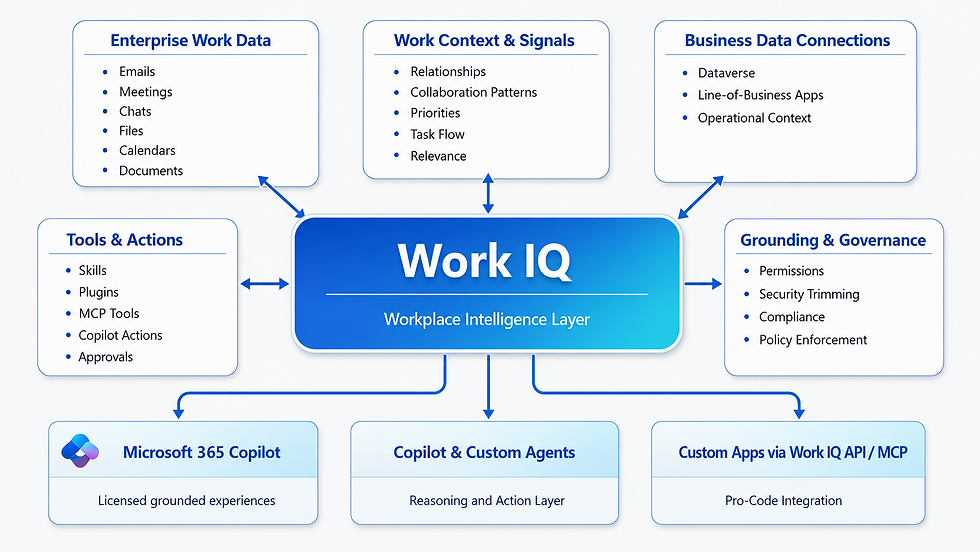
Fabric IQ represents the business-semantic and governed data dimension of Microsoft IQ. If Work IQ explains how work unfolds across people, content, and collaboration, Fabric IQ explains the state of the business in the language of the business. It is grounded in analytical, operational, and real-time enterprise data across Microsoft Fabric and OneLake, but Microsoft’s newer framing makes clear that raw data alone is not enough. Fabric IQ raises data into governed business meaning by combining unified data, Power BI semantic models, and ontologies that define entities, relationships, properties, rules, and actions. This matters because agents and applications do not make reliable decisions simply by reading tables; they need to understand business concepts such as customers, orders, assets, shipments, risks, breaches, or cases in a consistent, reusable way. Fabric IQ provides that layer of business semantics so that analytics, Copilot experiences, custom agents, and applications can all reason over the same trusted definitions. It also strengthens actionability by using ontologies that define not only what business entities mean but also which governed actions are valid in relation to them. Architecturally, this makes Fabric IQ more than a data-access feature. It becomes part of Microsoft IQ that turns enterprise data into a reusable business language for AI. Fabric itself remains the unified SaaS analytics foundation, and Fabric data agents remain a conversational surface over governed Fabric sources, but under the Microsoft IQ framing, Fabric IQ is the capability that allows those experiences to carry durable business meaning rather than only query structured data. [Sources: Fabric IQ overview; Microsoft Fabric overview]

Foundry IQ adds another important dimension to Microsoft IQ by focusing on curated institutional knowledge and multi-source agentic retrieval. Whereas Work IQ is strongest on live work context and Fabric IQ is strongest on governed business semantics, Foundry IQ is designed to build configurable knowledge bases across internal and external sources so agents can retrieve grounded information with citations, permissions, and retrieval reasoning across multiple repositories. It is especially relevant for custom agents and AI applications built in Microsoft Foundry because it provides a shared knowledge layer that multiple agents can reuse instead of each agent building its own isolated retrieval pipeline. Its knowledge bases can connect to sources such as SharePoint, OneLake, Azure storage, and public web content, while the retrieval engine can plan queries, decompose them into subqueries, search across sources, and return permission-aware grounded results. In that sense, Foundry IQ helps solve the institutional knowledge problem for pro-code and custom-engine scenarios: it gives developers a reusable, governed retrieval layer that sits closer to custom execution runtimes than Work IQ does, while still participating in the broader Microsoft IQ model. [Source: Foundry IQ | Microsoft Learn]
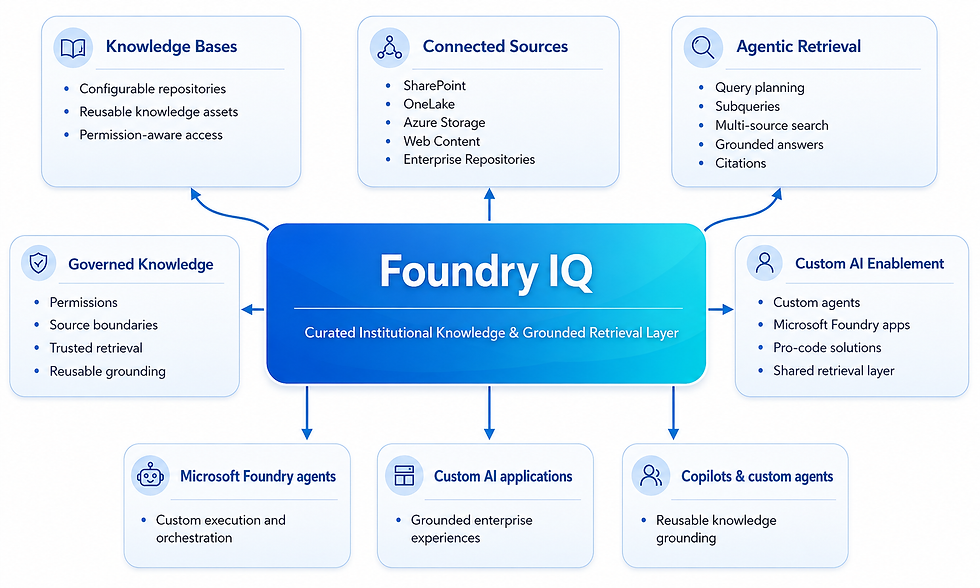
Web IQ introduces fresh external intelligence into the Microsoft IQ architecture. Microsoft presents Web IQ as the capability that gives Copilot and agents access to up-to-date information from across the web, complementing internal work signals, business semantics, and curated institutional knowledge with current external context. This matters because enterprise reasoning increasingly depends on more than internal data alone. Market conditions, regulations, competitor activity, changes in standards, public announcements, and other external developments can materially affect the quality of AI recommendations, analyses, and actions. By making Web IQ part of Microsoft IQ rather than treating web grounding as an unrelated add-on, Microsoft is signaling that enterprise AI should reason across both internal and external realities in a unified way. Architecturally, Web IQ extends the enterprise intelligence layer beyond organizational boundaries, helping Copilot and agents incorporate timely public information when the use case requires a broader understanding of the outside world. [Sources: Microsoft Web IQ; Microsoft IQ | Unified Enterprise Intelligence for AI]

Together, these capabilities make Microsoft IQ a clearer enterprise-intelligence description than the older split between an “intelligence layer” and a separate “data and business semantics” layer. Work IQ explains work context and productivity reality. Fabric IQ explains the governed state and language of the business. Foundry IQ explains curated, reusable knowledge across distributed sources. Web IQ adds fresh external context. Together, they provide shared intelligence for Microsoft 365 Copilot, Microsoft-provided agents such as Researcher and Analyst, emerging Frontier experiences such as Cowork and Scout, custom agents built in Copilot Studio, and pro-code agents or applications built in Microsoft Foundry. This also clarifies the surrounding layers: the User Experience Layer is where people interact with Copilot and agent experiences; the Agent Layer defines how those experiences are packaged into specialized or more execution-oriented agents; the Integration & Extensibility Layer defines how those agents reach tools, systems, and protocols; the Enterprise Intelligence Layer provides shared context; and the Execution Platform Layer provides the runtime foundation. Governance and security apply across all of them as cross-cutting controls.
Example: Work IQ helps a Copilot response stay grounded in the user’s recent meetings, shared files, chat history, and people context rather than only on a generic model answer.
Execution Platform Layer (Microsoft Foundry)
Microsoft Foundry (previously Azure AI Foundry) is the execution and development layer of Microsoft’s AI architecture. If Microsoft 365 Copilot is the main user-facing productivity surface and Microsoft IQ is the shared intelligence layer, Foundry is where organizations build, run, extend, and operate custom AI systems at enterprise scale. It provides a unified environment for custom agents, AI applications, model-driven workflows, and specialized runtime logic, together with enterprise controls such as identity integration, role-based access control (RBAC), networking, observability, deployment controls, and compliance support. [Source: Microsoft Foundry overview]
Foundry is more than a place to call models. It is an end-to-end AI application and agent platform that brings together model selection, orchestration, tooling, evaluation, deployment, and operations in one managed cloud environment. That makes it the natural execution layer for scenarios that go beyond standard Microsoft 365 Copilot experiences, including custom operational copilots, domain-specific assistants, automation agents, multimodal solutions, and long-running workflows that need developer-controlled behavior. [Source: Microsoft Foundry overview]
A central part of this layer is Foundry Agent Service, which provides the runtime for developer-controlled agents. These agents can combine models, instructions, memory, orchestration logic, and tools to interpret requests, plan steps, retrieve information, invoke actions, and complete multi-step tasks. Foundry Agent Service handles hosting, scaling, orchestration, tool execution, state, memory, and observability. It is especially relevant for execution-oriented systems such as operational copilots, automation agents, cross-system workflow orchestrators, and domain-specific reasoning applications that must go beyond static prompting into governed, tool-using behavior. [Source: Microsoft Foundry overview]
Beyond agent runtime, Foundry can be combined with Microsoft AI services for speech, language, vision, document intelligence, search, and content safety. These services matter because they let organizations assemble intelligent workflows from reusable platform capabilities instead of building every function from scratch.
These services include capabilities such as:
Speech: speech-to-text, text-to-speech, and translation
Language and translation: natural language understanding, summarization, and multilingual processing
Vision: image and video analysis
Document intelligence: extracting structured data from documents
Search: AI-powered retrieval over large datasets
Content safety: detection of harmful or inappropriate content
Together, these services form an extensible platform capability layer. A solution might use document intelligence to extract structured information from contracts, language services to summarize it, search to retrieve supporting evidence, and speech services to present results through voice. In Foundry-based solutions, many of these capabilities can be invoked through tools or service integrations, allowing agents or applications to choose the right capability at runtime.
Foundry also includes a comprehensive model layer via its model catalog, providing teams with access to a wide range of foundation and specialized models. These include Microsoft-hosted models, such as Azure OpenAI models, as well as partner and open-source models. As currently documented, Microsoft Foundry provides access to a very large and growing catalog of models, including more than 1,900. This breadth matters because execution platforms must support different requirements for reasoning, modalities, costs, latency, and governance across use cases. Foundry therefore enables organizations to choose the model that best fits a specific scenario and combine it with tools, orchestration logic, and enterprise controls within a single execution environment.
The catalog supports:
Large language models for reasoning and generation
Multimodal models for text, image, and audio tasks
Domain-specific and industry models
Fine-tuned models customized for enterprise use cases
Foundry also provides evaluation, comparison, deployment, and operational tooling so teams can select appropriate models, test them, observe their behavior, and run them reliably in production. This is what makes Foundry an execution platform rather than only a hosting surface: it brings together models, tools, orchestration, runtime operations, and enterprise controls in one environment that developers can use to build and scale custom AI systems.

Foundry matters most when you see it as part of the bigger architecture. Microsoft IQ gives it grounded enterprise context, and the integration layer connects it to tools, APIs, and external systems. In that sense, Foundry is not just a runtime. It is the layer that turns Microsoft’s intelligence and integrations into working AI solutions.
Example: A legal operations team uses Foundry to run a contract-review agent that extracts obligations, summarizes risk clauses, and routes exceptions for human review.
Governance, Security Across the Microsoft AI Stack
Governance and security in Microsoft’s AI stack are best understood as a single cross-cutting control fabric rather than as a feature of only one product. Microsoft 365 Copilot, agents, integration endpoints, Microsoft IQ, and Microsoft Foundry do not create an entirely separate governance model. Instead, they inherit and amplify the foundational controls that already shape how enterprise systems are accessed, protected, monitored, and managed. Those foundations include identity and access management in Microsoft Entra, least-privilege and role assignment models across Microsoft 365 and Azure, information protection and compliance controls in Microsoft Purview, audit and visibility services across Microsoft 365 and Entra, operational observability through Azure Monitor, Log Analytics, and Application Insights, and threat detection and response through Microsoft Defender. This matters because the Microsoft AI stack becomes trustworthy in production only when those controls are understood both as enterprise foundations and as active constraints on how AI capabilities retrieve data, invoke tools, take actions, and remain accountable. [Sources: Secure and govern Copilot - foundational deployment guidance; What is Microsoft Entra?; Learn about Microsoft Purview; Azure Monitor overview; What is Microsoft Defender XDR?]
Viewed architecturally, these controls can still be understood through two closely connected foundational domains: Data Access & Information Protection and Observability & Auditability. The difference is that, in the context of the Microsoft AI stack, those domains should not be treated as preliminary background material only. They must also be read as the control mechanisms that govern how each layer of the stack behaves in practice.
Foundational Control Domains
Data Access & Information Protection
Data access and information protection remain central to a secure Microsoft environment. Before any user, service, or AI system interacts with organizational data, the organization must determine who can access that data, under which identity context, with which permissions, and under what protection policies. In Microsoft’s ecosystem, that foundation is shaped by identity management, role-based access control, classification, sensitivity labels, data loss prevention, and compliance controls. These capabilities prevent oversharing, bound retrieval and action-taking, and help ensure that data remains governed regardless of where it is stored, shared, grounded, or used across the Microsoft AI stack.
Identity Foundation (Microsoft Entra ID)
Microsoft Entra ID is Microsoft’s cloud identity and access management service, and it provides the identity foundation that the broader Microsoft AI stack inherits across Microsoft 365, Azure, and connected enterprise systems. For this architecture, the most important starting point is the distinction between human identities and machine identities. Human identities represent people who sign in and work directly in Microsoft 365. Machine identities represent non-human actors in the environment and include both workload identities and device identities. Workload identities are especially important in AI scenarios because many agents, tools, APIs, connectors, and background services do not act only for a user; they often authenticate and execute through a software identity. [Sources: What is Microsoft Entra?; What are workload identities?]
Because workload identities are central to many AI architectures, it helps to understand how Microsoft Entra models them. The starting point is app registration. Registering an application establishes its identity configuration in the Microsoft identity platform and creates two related objects with different roles: an application object and a service principal. The application object is the app’s global definition in its home tenant. It describes what the app is and how it is configured, including settings such as supported account types, redirect URIs, and the permissions the app may request. The service principal is the tenant-local representation of that application. It is the identity that actually signs in, receives permissions, and is governed when the app accesses resources in a tenant. This distinction matters because it separates global app definition from tenant-local execution and control. In AI scenarios, that helps explain whether an organization is defining the software identity itself, governing how it operates inside a specific tenant, or both. [Source: Apps & service principals in Microsoft Entra ID - Microsoft identity platform]
A managed identity extends that same workload-identity model into Azure-hosted execution. It is an Entra identity assigned to an Azure resource, so the workload can obtain tokens without manually storing or rotating credentials. In practical terms, it is the preferred identity pattern when an AI component runs as an Azure-hosted service and needs secure access to other protected resources. This completes the workload-identity picture introduced above: app registration defines the application, the service principal represents it inside a tenant, and the managed identity provides a Microsoft-managed identity for supported Azure resources. [Source: Managed identities for Azure resources - Managed identities for Azure resources]
Once that identity model is clear, the next question is how an AI capability actually runs at runtime. In some cases, it operates in delegated user context, meaning it acts on behalf of a signed-in user and can reach only what that user is already allowed to access. In other cases, it runs in application context, meaning it acts through its own workload identity, such as a service principal or managed identity, using permissions granted directly to that application or Azure-hosted resource. This distinction is critical in AI scenarios because agents, connectors, and integrations may operate in either mode. The earlier distinction among app registration, service principal, and managed identity therefore matters not as administrative detail, but because it explains which identity is being used at runtime and how access is granted.
For the purposes of this architecture, the most important identity question is therefore simple: is the AI capability acting for a signed-in user, or is it acting through its own workload identity? That distinction belongs in the identity foundation because it determines who or what is being authenticated before the document later turns to the broader governance consequences, such as least privilege, auditability, approval boundaries, and accountability.
Role‑Based Access Control (RBAC)
Microsoft uses Role-Based Access Control (RBAC) across Microsoft Entra ID and Microsoft 365 to assign permissions through predefined roles rather than individual grants. This supports consistent administration and reinforces the principle of least privilege by ensuring users and systems receive only the access they need to perform their tasks. [Sources: What is Azure role-based access control (Azure RBAC)?; What is Microsoft Entra?]
In Microsoft Entra ID, RBAC governs which users, groups, applications, service principals, and managed identities can perform actions across identity, security, and platform services. This includes tasks such as managing identities, configuring security settings, accessing APIs, and operating AI agents. These role assignments provide the identity foundation that AI systems, services, and agents inherit when they authenticate and act within the tenant.
In Microsoft 365, access is enforced through service-specific permission models built on Entra ID identities. These permissions control access to resources such as SharePoint sites, OneDrive files, Teams, Exchange mailboxes, and Microsoft Graph data. As a result, both users and AI systems can view or act on only the content and capabilities they are explicitly authorized to access.
In Azure, RBAC is used to manage access to subscriptions, resource groups, and individual resources by assigning built-in or custom roles to users, groups, service principals, and managed identities. This scope-based model helps organizations enforce least-privilege access for administration and operations, including AI-related services such as Microsoft Foundry, while maintaining clear separation of duties and governance over cloud resources.
Information Protection and Compliance (Microsoft Purview)
Microsoft Purview is Microsoft’s platform for information protection, data governance, and compliance. It enables organizations to classify, protect, monitor, and manage data across Microsoft 365, Azure, and connected systems. Through sensitivity labels and Data Loss Prevention, Purview provides policies that define how data can be used, not just who can access it. [Source: Learn about Microsoft Purview]
Sensitivity Labels are Purview’s tool for classifying information, helping organizations identify and safeguard data based on its sensitivity and business implications. They are applied to content such as documents and emails in Microsoft 365, specifying how the data should be managed, shared, and protected. These labels do not automatically grant access; instead, they work with identity and permissions to enforce uniform data-handling policies.
Data Loss Prevention (DLP) is Purview’s information protection capability that helps organizations prevent the unintended exposure or misuse of sensitive data. DLP policies define rules for how information can be shared, transmitted, or acted upon across Microsoft 365 workloads, based on factors such as data type, sensitivity labels, and context.
Observability & Auditability
Within Microsoft’s ecosystem, observability and auditability are integral platform features offered by core security, compliance, and operations services. These enable organizations to log activities, track identity usage, monitor application and infrastructure performance, investigate irregularities, and support operational or compliance assessments. Collectively, they constitute the visibility layer that facilitates ongoing monitoring, auditing, and governance of enterprise systems and AI-enabled workloads. [Sources: Azure Monitor overview; What is Microsoft Entra monitoring and health?; Learn about Microsoft Purview]
Microsoft Purview Audit provides a centralized audit trail across Microsoft 365 services, logging thousands of user and administrator actions. These logs can be searched later for investigation, forensic analysis, compliance checks, and internal reviews. It helps answer questions like what activity took place, who it carried out, when it happened, and which workload was affected. [Sources: Learn about Microsoft Purview; Use Microsoft Purview to manage data security & compliance for Microsoft 365 Copilot & Microsoft 365 Copilot Chat]
Microsoft Entra audit logs track changes in directories and configurations, covering users, groups, applications, service principals, roles, licenses, and related identity objects. Meanwhile, Microsoft Entra sign-in logs offer insights into authentication activities, including user sign-ins, non-interactive sign-ins, service principals, and managed identities. Combined, these logs deliver essential identity and activity data, enabling the reconstruction of events, the review of administrative changes, and the establishment of traceability within the Microsoft environment.
From an observability standpoint, Azure Monitor is Microsoft’s comprehensive monitoring platform for collecting, analyzing, and responding to telemetry across cloud and hybrid systems. It consolidates logs, metrics, traces, and events into a unified operational view, helping teams assess the health, performance, and reliability of their applications and infrastructure. In this framework, Log Analytics functions as the primary workspace for storing and querying log and trace data with the Kusto Query Language. Meanwhile, Application Insights offers application performance monitoring features, such as distributed tracing, live metrics, failure and performance analysis, and transaction-level diagnostics. These tools enable engineering and operations teams to identify issues, explore system behavior, set up alerts, create dashboards and workbooks, and diagnose problems over time. [Sources: Azure Monitor overview; Overview of Log Analytics in Azure Monitor - Azure Monitor]
Microsoft Defender XDR broadens visibility beyond simple logging and monitoring by integrating security operations. It analyzes signals from identities, endpoints, email, collaboration tools, and cloud services to help security teams detect threats, investigate incidents, and coordinate responses across diverse attack surfaces. While observability and auditability reveal what occurred, Defender XDR enhances this with cross-domain correlation, incident context, alerting, and response workflows, enabling organizations to act on insights. The combination of Microsoft Purview Audit, Entra logs, Azure Monitor, Log Analytics, Application Insights, and Defender XDR offers a solid foundation for operational visibility, traceability, investigation, and response within the broader Microsoft ecosystem. [Source: What is Microsoft Defender XDR?]
Finally, in addition to centralized audit and monitoring services such as Microsoft Purview Audit, Microsoft Entra logs, Azure Monitor, and Defender XDR, administrators also depend on service-level reporting and workload-specific administrative portals to gain broader operational visibility across the tenant. The Microsoft 365 admin center provides high-level reporting on usage, adoption, service health, and activity trends across core Microsoft 365 workloads, helping administrators understand how services are being used and where governance or operational attention may be required. Workload-specific portals, such as the SharePoint Admin Center, extend that visibility further by exposing insights tied to specific services, including site activity, storage usage, sharing behavior, external access patterns, and other administrative signals relevant to governance and oversight. These reporting surfaces do not replace centralized audit logs or security telemetry, but they complement them by offering practical administrative context, trend analysis, and service-level visibility that support day-to-day operational review, governance decisions, and continuous monitoring across the Microsoft environment.

Inherited security and governance controls
Microsoft 365 Copilot and Copilot Chat inherit Microsoft 365 identity, permissions, compliance, and data protection controls. Their responses are grounded only in data the user is already authorized to access, which means oversharing, stale permissions, or weak information governance directly affect the quality and risk profile of Copilot results. That is why Microsoft’s Copilot deployment guidance emphasizes remediating oversharing, applying Purview protection controls, and using SharePoint governance measures before and during rollout. The Agent Layer inherits these same controls, but with added governance needs because agents can reason, invoke tools, and sometimes take actions. Agent security therefore depends not only on user permissions and protected grounding data, but also on explicit identity models, lifecycle governance, action boundaries, approval requirements, and runtime oversight. In practice, organizations need to know whether an agent operates under delegated user context, application context through a workload identity, or a documented platform-managed identity model, because that choice affects permissions, accountability, and risk. Governance must also cover the full lifecycle of the agent, including who can create, approve, publish, modify, monitor, disable, or retire it, as well as which tools and actions the agent may use, in which systems, and under what policy boundaries. As agents become more autonomous and execution-oriented, these controls become even more important because they preserve least-privilege access, auditability, traceability, and human oversight for sensitive or high-impact actions. The Integration Layer extends these concerns into connectors, APIs, MCP servers, plugins, actions, and A2A scenarios, where identity context, data boundaries, tenant policies, and auditing determine what live systems agents can reach and what they can do there. The Enterprise Intelligence Layer also depends on governance foundations: Work IQ, Fabric IQ, Foundry IQ, and Web IQ only become trustworthy intelligence layers when their inputs are permission-aware, policy-bound, auditable, and protected from oversharing or leakage. Finally, Microsoft Foundry inherits Azure and Microsoft security controls for custom AI systems, including Entra-based identity, Azure RBAC, network controls, content safety, observability, and compliance tooling. Together, these relationships make it clear that governance in the Microsoft AI stack is not a separate afterthought. It is the control fabric that shapes how every layer accesses data, takes actions, exposes risk, and remains accountable in production.
Identity Context, Access Boundaries, and Accountability
Identity context is one of the most important governance questions in the Microsoft AI stack because it determines how access is authorized, how policies are enforced, and how actions are attributed. For AI governance, the key practical distinction is whether a capability runs in delegated user context or in application context through a workload identity such as a service principal or managed identity. That choice affects what data can be reached, which permissions apply, whether Conditional Access and least-privilege design have been enforced appropriately, and how later investigations can establish who or what performed an action. In practice, a Copilot plugin or connector may run in delegated user context, while a scheduled background integration, Foundry-hosted service, or workflow agent may run through its own workload identity with permissions granted directly to that workload. For that reason, every meaningful AI capability in the Microsoft stack should have an explicit identity model, a bounded access model, and a clear accountability path for approval, audit, and lifecycle review.
From a governance perspective, that identity choice is never a minor implementation detail. It determines whether Conditional Access can apply at the user, agent, or workload-identity level; whether least-privilege design has been enforced correctly; whether permissions can be reviewed and revoked cleanly; and whether later investigations can establish who or what actually performed an action. Microsoft’s Copilot deployment guidance reinforces the same principle from a data-governance angle: because Copilot and agents respect existing permissions and policies, oversharing, stale access, weak site governance, or poorly controlled application permissions can become AI risk amplifiers unless they are reviewed and remediated. For that reason, every meaningful AI capability in the Microsoft stack should have an explicit identity model, a bounded access model, and a clear accountability path for approval, audit, and lifecycle review.
Microsoft Agent 365 (GA)
Within that broader governance fabric, Microsoft Agent 365 functions as a centralized governance and administration plane for observing, governing, and securing agents across the organization. It is the place where IT, security, and business administrators can observe agent activity, govern lifecycle and access, and secure agents at scale regardless of where those agents originate. Its value is not that it replaces Microsoft Entra, Purview, Defender, or Azure operations tools, but that it connects them into an agent-centered governance plane. As of May 1, 2026, Microsoft Agent 365 is generally available for the Commercial segment on a per-user basis, although some related patterns and integrations discussed elsewhere in this article remain Preview, Frontier, or Emerging depending on the specific capability. [Source: Microsoft Agent 365 overview]
Through the Agent 365 registry and related administrative experiences, organizations gain centralized visibility into which agents exist, who owns them, how they are used, which identities they run under, what health or risk signals they generate, and how their lifecycle is managed from onboarding through retirement. This is particularly important as organizations move beyond a small number of conversational assistants into larger ecosystems of built-in agents, custom Copilot Studio agents, Foundry-based agents, background agents, and more autonomous patterns such as Scout-style or scheduled agent scenarios where Microsoft documents those patterns. Agent 365 also strengthens governance by connecting agent identity and access decisions to Microsoft Entra, data protection and compliance controls to Microsoft Purview, and runtime threat detection to Microsoft Defender. In practice, that means organizations can apply consistent least-privilege principles, maintain auditability, onboard agents intentionally, flag ownerless or risky agents, enforce lifecycle reviews, and extend enterprise-grade controls to agents that interact with Microsoft 365 data and business systems. Architecturally, Agent 365 is important because it gives the Microsoft AI stack a more centralized agent governance plane, rather than relying solely on fragmented per-product administration.
Example: Agent 365 gives administrators a central place to approve agents, review ownership, monitor usage, and retire risky or unused agents.
Operational governance practices
Several operational governance practices are also essential across the stack and are easy to underestimate if governance is described only in abstract terms. These practices include:
Oversharing remediation is foundational: because Copilot, agents, and intelligence layers honor existing permissions, poorly governed SharePoint sites, Teams content, files, and mailboxes can become AI risk amplifiers unless access is reviewed and corrected.
Human oversight and approval patterns matter more as agents become more autonomous. Multi-step coordinators, such as Cowork, and more persistent or background agents, such as Scout-style patterns, should not be governed like basic chat assistants; they require stronger approval, escalation, and lifecycle expectations.
Runtime protection matters in both Microsoft 365 and Foundry-based scenarios. Defender, content safety controls, and policy-aware runtime protections help detect unsafe behavior, malicious prompts, risky tool use, or abnormal activity after deployment, not only before it.
Observability and auditability must remain continuous. Purview Audit, Entra audit and sign-in logs, Azure Monitor, Log Analytics, Application Insights, Defender telemetry, and service-level reporting together provide the evidence needed to investigate incidents, review agent behavior, assess value, and satisfy compliance requirements.
Clear ownership and retirement processes are as important as deployment. Every agent should have an accountable owner, a defined identity model, explicit access boundaries, and a review path for change, suspension, or retirement. When these practices are combined with Entra, Purview, Defender, Agent 365, and Responsible AI controls, governance and security become a coherent operating model for safe and scalable AI adoption rather than just a list of separate technologies.
Responsible AI as a governance discipline
In the Microsoft AI Stack, Responsible AI complements security and governance foundations by addressing the human, ethical, and behavioral dimensions of AI. Together, these controls ensure that AI systems are not only secure and compliant but also predictable, explainable, and aligned with organizational intent as they move into mission-critical roles. Microsoft frames Responsible AI through six enduring principles that are especially relevant in enterprise AI.
Fairness means AI systems should avoid producing systematically biased or unjust outcomes, especially when summarizing, recommending, ranking, or influencing decisions that affect people or teams.
Reliability and safety mean systems should behave consistently, resist harmful failure modes, and remain bounded by controls when used in sensitive or high-impact contexts.
Privacy and security mean AI must respect data boundaries, permissions, confidentiality, and protective controls throughout grounding, reasoning, and action-taking.
Inclusiveness means experiences should be usable and accessible across diverse users, roles, and needs.
Transparency means users and administrators should be able to understand what grounded an answer, which tools or sources were used, and when AI-generated output requires scrutiny.
Accountability means human owners remain responsible for how AI is designed, deployed, governed, approved, monitored, and corrected over time. In practice, these principles are operationalized through measures such as evaluations, red teaming, content safety, groundedness checks, auditability, human approvals, and documented deployment practices, making Responsible AI a practical governance discipline rather than only a set of abstract values.
Conclusion
Microsoft’s AI offering is no longer best understood as a set of isolated products. It is better read as a connected enterprise architecture in which each layer plays a distinct role. In this article, that layered view is an author synthesis, not an official Microsoft canonical architecture. Within it, Microsoft 365 Copilot provides the main user experience, agents package intelligence into specialized and increasingly execution-oriented forms, the integration and extensibility layer connects those experiences to live systems and tools, Microsoft IQ provides shared enterprise intelligence, and Microsoft Foundry provides the execution platform for custom AI systems. Across all layers, governance and security remain cross-cutting control domains that shape identity, permissions, data protection, observability, lifecycle control, and responsible AI in production. The practical message is simple: organizations will benefit most when they stop treating Copilot, agents, data, and security as separate conversations and instead design them as one AI operating model.
What should organizations do next?
Organizations that want to move from architectural understanding to practical adoption should start with a small set of disciplined next steps. The goal is not to deploy everything at once, but to build the right foundations before scaling AI across the enterprise.
Review Microsoft 365 readiness: confirm licensing, deployment assumptions, data sources, search quality, and user enablement before expanding AI capabilities.
Clean up permissions and oversharing: reduce stale access, improve SharePoint and Teams governance, and apply Purview protection controls so Copilot and agents inherit safer data boundaries.
Identify high-value AI workflows: start with repeatable, high-friction scenarios where Copilot or agents can save time, improve consistency, or reduce manual work.
Choose the right agent-building path: use Agent Builder for simple declarative agents, Copilot Studio for low-code business agents, and Microsoft Foundry for developer-controlled custom AI systems.
Define governance before scaling: make identity context, ownership, approval, observability, and lifecycle controls explicit before introducing more autonomous or action-taking agents.
Start with a controlled pilot: test with a bounded use case, measure value and risk, refine controls, and then scale intentionally rather than rolling out broadly at once.
Key Terms
The terms below summarize the most important products and concepts used in this post. They are included as a quick reference for readers who want a shorter reminder of the core architecture, intelligence, integration, identity, and governance vocabulary used throughout the document. The list is sorted alphabetically and grounded in Microsoft documentation.
Adaptive Cards: A structured UI format that Microsoft uses in some agent and Copilot experiences to present actionable content, collect input, and support lightweight workflows inside the conversation surface. In this document, Adaptive Cards are treated as a presentation mechanism rather than a separate protocol or orchestration model.
Agent identity context: The identity context under which an agent operates. Depending on architecture, an agent might act under delegated user context, application context through a workload identity, or a documented platform-managed identity model. The key governance requirement is that this identity model be explicit so access can be controlled and actions can be attributed appropriately.
Agent-to-Agent (A2A): A supported interaction model in the Work IQ API for structured delegation between agents and multi-agent workflows. It is most relevant when one agent hands off work to another agent rather than only calling a tool or endpoint.
AG-UI: A protocol documented in Microsoft Agent Framework for building web-based agent applications with streaming, session management, state synchronization, approval workflows, and custom UI components.
Application context: A runtime model in which software acts through its own workload identity, such as a service principal or managed identity, rather than on behalf of a signed-in user. This distinction is important for governance, permissions, and accountability in AI systems.
Application Insights: An application performance monitoring capability within Azure Monitor that provides telemetry such as distributed tracing, live metrics, failure analysis, and performance diagnostics for applications and services.
Application object: The global definition or blueprint of an application in Microsoft Entra ID. It exists in the app’s home tenant and acts as the template from which service principals are created in each tenant where the application is used.
Application permission (app-only access): A permission granted directly to an application so it can act as itself without a signed-in user. It is commonly used for background services, automation, and daemon-style workloads.
Autopilots: A term Microsoft uses in specific Microsoft Agent 365 and Microsoft Foundry contexts for governed autonomous agent scenarios. In this document, autopilot is treated as a governed deployment pattern rather than a universal label for every Microsoft agent experience.
Conditional Access: A Microsoft Entra capability that enforces access decisions based on conditions such as user, group, application, device, location, or workload identity. In this document, it matters because access to AI capabilities can be bounded by these policies.
Copilot agent: A specialized AI assistant that extends Microsoft 365 Copilot for specific business scenarios. In this document, the two main approaches are declarative agents, which use Microsoft-managed orchestration, and custom engine agents, which let organizations bring their own orchestration, models, and integrations.
Copilot Cowork (Preview): A Frontier preview capability in Microsoft 365 Copilot that can coordinate multi-step work across Microsoft 365 on a user’s behalf while showing progress and requiring approval before actions occur.
Copilot Notebooks: An AI-powered scoped workspace where users assemble selected sources such as chats, files, meeting notes, and pages so Copilot can reason over a curated context boundary instead of the broader environment.
Copilot Pages: Persistent, shareable workspaces for capturing and refining AI-generated outputs so teams can edit, organize, and develop content collaboratively over time.
Copilot Search: An AI-enhanced search experience within Microsoft 365 Copilot that uses semantic understanding, context, and permissions to help users find relevant information across Microsoft 365 and connected sources.
Data Loss Prevention (DLP): A Microsoft Purview capability that helps prevent the unintended exposure or misuse of sensitive data by applying rules about how information can be shared, transmitted, or acted upon across supported workloads.
Declarative agent: An agent model in which the builder defines what the agent should do through instructions, knowledge, and actions, while Microsoft’s platform manages how the agent is orchestrated and executed.
Delegated access: An access model in which an application acts on behalf of a signed-in user. Both the application and the user must be authorized, and the application receives delegated permissions or scopes for the target resource.
Delegated user context: A runtime model in which a capability acts on behalf of a signed-in user and can access only what that user is already permitted to access.
External identity: An identity used for guests, partners, customers, or other people outside the organization’s workforce tenant. In Microsoft Entra, external identities extend secure access beyond internal users while still applying organizational controls.
Fabric IQ: A capability in Microsoft Fabric that raises unified data into governed business meaning through semantic models, ontologies, and related business concepts. In this document, it is treated as the business-semantic dimension of Microsoft IQ.
Facilitator: An AI-powered Microsoft Teams agent that helps keep meetings focused and action-oriented by surfacing agendas, tracking progress, and capturing key highlights and notes in real time.
Federated connector: A Microsoft 365 Copilot connector model that retrieves information in real time at query time without ingesting or storing that content in Microsoft Graph.
Foundry Agent Service: A managed platform in Microsoft Foundry for building, deploying, hosting, and scaling AI agents using supported models, tools, identity, and observability features.
Foundry IQ: A configurable multi-source knowledge capability in Microsoft Foundry that gives agents permission-aware access to curated organizational knowledge and retrieval across multiple repositories.
Grounding: The process of providing an AI system with relevant context at the time of a request so the response is based on current enterprise or external data rather than only the model’s general training.
Lexical index: An index that helps the system find content through words, phrases, and exact or near-exact matches.
Log Analytics: The Azure Monitor workspace capability used to store and query log and trace data, commonly with the Kusto Query Language.
Managed identity: A Microsoft Entra identity for an Azure resource that Microsoft manages automatically so the workload can obtain tokens without storing or rotating credentials.
Microsoft 365 Copilot: Microsoft’s primary AI assistant experience embedded across Microsoft 365 apps such as Word, Excel, Outlook, and Teams. It provides the conversational, user-facing layer through which people interact with Microsoft’s AI capabilities.
Microsoft Agent 365: Microsoft’s centralized governance and administration plane for observing, governing, and securing agents across the organization.
Microsoft Entra ID: Microsoft’s cloud identity and access management service. It provides the identity foundation for authentication, access control, Conditional Access, applications, service principals, managed identities, device identities, and related security controls across Microsoft 365, Azure, and connected services.
Microsoft Foundry: Microsoft’s unified enterprise AI platform for building, deploying, and operating custom AI systems in Azure. In this document, it is treated as the Execution Platform Layer of the Microsoft AI stack.
Microsoft Graph: The gateway to data and intelligence across Microsoft 365 and Microsoft Entra. In this document, it is treated as a foundational context and data-access capability for Microsoft 365 Copilot and related experiences.
Microsoft IQ: Microsoft’s unified enterprise intelligence layer for AI, documented as bringing together Work IQ, Fabric IQ, Foundry IQ, and Web IQ.
Microsoft Purview: Microsoft’s platform for information protection, data governance, compliance, and audit capabilities across Microsoft 365, Azure, and connected systems.
Microsoft Scout (Preview): A Frontier preview desktop AI application for Windows and macOS that can take action across local files, shell commands, browser sessions, development tools, and Microsoft 365 data while requiring approval before sensitive actions.
Model Context Protocol (MCP): A protocol Microsoft uses across several extensibility scenarios to connect agents to tools, resources, and external systems.
MCP apps: Interactive UI widgets powered by MCP servers and rendered inside Microsoft 365 Copilot so agents can deliver richer app-like experiences beyond plain text.
OneLake: Microsoft Fabric’s single, unified, logical data lake for the whole organization. It is designed to be the single place for analytics data across a Fabric tenant.
Ontology: A shared, machine-understandable business vocabulary in Fabric IQ that defines entity types, properties, relationships, rules, and constraints so humans and AI agents can reason consistently across domains and data sources.
Planner Agent: A Microsoft Planner agent that helps automate plan creation and task execution, and in some experiences provides an in-app natural language chat for plan updates, summaries, and insights.
Purview Audit: A Microsoft Purview capability that provides a centralized audit trail across Microsoft 365 services, logging many user and administrator actions for investigation, compliance, and review.
Researcher: An intelligent assistant within Microsoft 365 Copilot designed for complex, multi-step research tasks that draws insights from web and work content and produces source-cited reports.
Responsible AI: Microsoft’s governance discipline for ensuring AI systems are developed and used in ways that are fair, reliable, safe, private, secure, inclusive, transparent, and accountable.
Role-Based Access Control (RBAC): A model for assigning permissions through roles rather than individual grants. In this document, it is especially relevant in Microsoft Entra, Microsoft 365, and Azure governance scenarios
Semantic Index: An advanced lexical and semantic index generated from content in Microsoft Graph to improve search relevance and help produce contextually relevant responses in Microsoft 365 Copilot.
Sensitivity labels: Microsoft Purview labels used to classify and protect information based on sensitivity and business impact.
Service principal: The local representation of an application object in a specific Microsoft Entra tenant. It is the identity through which the application instance signs in and receives permissions in that tenant.
Synced connector: A connector model that ingests external content into Microsoft Graph so it can be indexed and used by Copilot experiences such as search and grounded reasoning.
Vector: A mathematical representation of features and relationships within content that helps semantic systems compare conceptual similarity at scale.
Web IQ: The Microsoft IQ capability that brings up-to-date external web information into enterprise AI reasoning.
Work IQ: The workplace intelligence layer that helps Microsoft 365 Copilot and compatible agents reason over work and take action by combining chat, context, tools, and workspaces while respecting permissions and policies.
Work IQ API (Preview): A preview API that exposes Work IQ through supported interaction models such as REST, Model Context Protocol (MCP), and Agent-to-Agent (A2A).
Work IQ MCP (Preview): A governed MCP tool surface that exposes Work IQ-backed Microsoft 365 intelligence capabilities to supported clients such as Microsoft 365 admin center, Copilot Studio, and Microsoft Foundry.
References
Core architecture and foundational concepts
Microsoft 365 Copilot user experience
Agents and agent experiences
Integration, connectors, APIs, and protocols
Federated connectors overview - Microsoft 365 Copilot connectors | Microsoft Learn
Extend your agent with Model Context Protocol - Microsoft Copilot Studio | Microsoft Learn
Connect to MCP Server Endpoints for agents - Microsoft Foundry | Microsoft Learn
Self-hosted remote MCP server on Azure Functions (public preview) | Microsoft Learn
Microsoft IQ and enterprise intelligence
Microsoft Foundry and execution platform
Governance, security, and deployment guidance
Secure and govern Copilot - foundational deployment guidance | Microsoft Learn
Microsoft 365 Copilot adoption analyst templates | Microsoft Learn
What is Microsoft Entra? - Microsoft Entra | Microsoft Learn
Apps & service principals in Microsoft Entra ID - Microsoft identity platform | Microsoft Learn
Overview of permissions and consent in the Microsoft identity platform | Microsoft Learn
Managed identities for Azure resources - Managed identities for Azure resources | Microsoft Learn
Microsoft Entra External ID Overview - Microsoft Entra External ID | Microsoft Learn
What is Azure role-based access control (Azure RBAC)? | Microsoft Learn
What is Microsoft Defender XDR? - Microsoft Defender XDR | Microsoft Learn
Use Microsoft Purview to manage data security & compliance for Microsoft Agent 365 | Microsoft Learn
What is Microsoft Entra monitoring and health? - Microsoft Entra ID | Microsoft Learn
Overview of Log Analytics in Azure Monitor - Azure Monitor | Microsoft Learn
SharePoint Site Usage Report - Microsoft 365 admin | Microsoft Learn
Microsoft 365 Admin Center Usage Reports Overview - Microsoft 365 admin | Microsoft Learn


Comments